
A Failed Booking occurs when a confirmed reservation from Livily does not successfully sync to your Property Management System (PMS). This can happen for several reasons — for example, if the PMS rejected the booking due to missing data, a temporary connection error, or availability mismatch.
The Failed Booking feature is designed to prevent overbookings while giving you control to review and take action manually.
🔍 What to Do When You See a Failed Booking
-
Review the Booking Details
Open the booking in your Livily dashboard to review the guest details, dates, and property information. -
Check Property Availability
Confirm that the requested dates are still available in your PMS or calendar. -
If the Dates Are Available:
-
Use the dropdown menu to change the booking status from “Failed” → “Confirmed.”
-
Once you update the status, Livily will automatically push the booking back to your PMS.
-
If the PMS previously rejected the booking, you’ll see an error message explaining why.
-
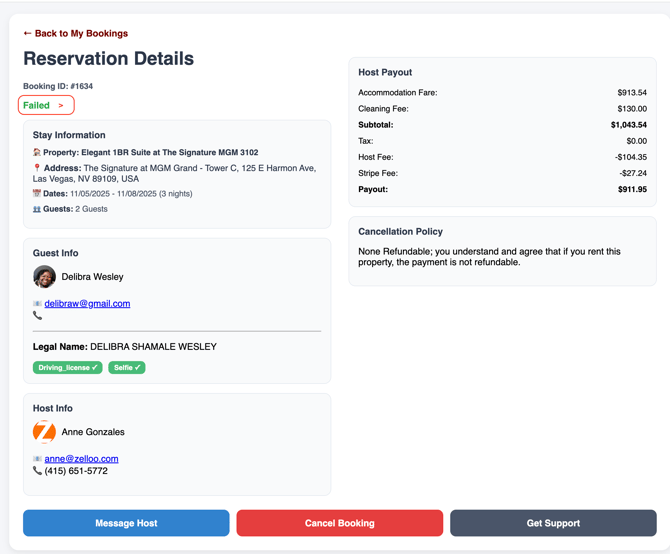
4. If the Property Is No Longer Available:
-
- Contact Livily Support with possible relocation options for the guest, or
- Request a cancellation directly from the booking record.
⚙️ Common Reasons for Failed Bookings
-
PMS temporarily disconnected or API timeout
- A time out with the PMS servers or down for maintenance
-
Rate or fee mismatch between Livily and your PMS
-
Listing was recently archived or unpublished in your PMS
-
Duplicate reservation detected by the PMS