
Corporate discounts on Livily are set directly within the platform as a promotion, similar to how you would configure promotional discounts on any other OTA.
The key difference is what happens behind the scenes. Livily connects your listings to over $700 billion in annual corporate travel demand, and your selected discount tier directly impacts your visibility across TMS and TMC networks.
In simple terms: higher discount tiers increase exposure, helping you reach more corporate travelers and drive incremental bookings—especially on low-occupancy days.
Discount Structure
Default Setup
-
20% off required discount to list.
-
Automatically applied to new listings
-
Are Promotions Stackable?
- Yes. Since the corporate discount is applied as a promotion on Livily, it will stack with any discounts already configured in your PMS, for example, weekly or monthly discounts.
Recommended Discounts
Summary
| Feature |
Dynamic 20% Recommended |
Dynamic 30% Recommended |
Dynamic 40% Recommended |
|---|---|---|---|
|
Average Discount |
10% | 20% | 30% |
| Discount Range | 0% - 20% | 10% - 30% | 20% - 40% |
| Visibility within Corporate travel networks. | 50% | 80% | 100% |
| Global Corporate Market | ✓ | ✓ | ✓ |
| Eligible Guaranteed Booking Nights - | ✗ | ✗ | ✓ |
Note: Discounts above 20% are ideal for hosts seeking higher occupancy and steady, predictable income through guaranteed booking partnerships.
Configuration Guide
Who Can Configure:
Property owners, management companies, and hosts.
Where:
-
Log in to your Livily Dashboard
-
Navigate to Profile → Corporate Discount Settings
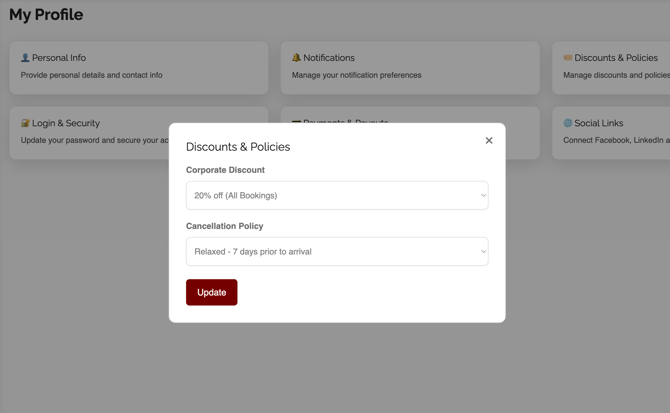
Editable Options:
-
Adjust discount percentage (10%–50%)
-
Enable/disable “20% First 3 Bookings per listing” promo will revert back to 10% once the first 3 bookings are completed.
-
Apply changes per listing or account-wide
Effect Timing:
All updates apply immediately to new reservations.
FAQ
Q1: Do I need a discount to onboard with Livily?
Yes. A corporate discount is required to activate your listing and qualify for distribution across TMS and TMC channels.
Q2: Can I update my discount later?
Yes. You can adjust your corporate discount at any time from your Livily settings.
Q3: Can I add additional discounts to underperforming properties?
Yes. In the Promotions section, you can layer additional discounts and set specific date ranges to boost occupancy during slower periods or shoulder seasons.
Q4: What is the Guaranteed Booking Nights program?
This exclusive Livily feature offers assured occupancy for hosts who provide deeper, premium discounts. These agreements function similarly to wholesale contracts, delivering more predictable booking volume. Learn more here:
Need Help?
For assistance updating your corporate discount or understanding eligibility for guaranteed nights, contact your Livily account manager or book a call using the Get Support